
Krempelkiste
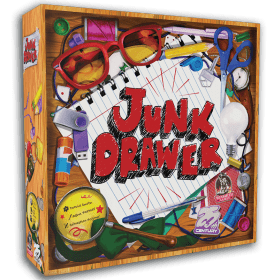 In Krempelkiste organisieren die Spieler ihre Kramschubladen, indem sie sorgfältig verschieden geformte Gegenstände in die vier Fächer ihrer Schublade legen. Jedes Fach hat ein bestimmtes Ziel, und die Spieler müssen in jeder Runde je einen Gegenstand in jedes ihrer Fächer legen. Am Ende des Spiels gibt es für jedes Fach Punkte, je nachdem, wie gut es organisiert ist. Der Spieler mit der höchsten Punktzahl gewinnt!
1-4 Personen - 15 Minuten - Ab 8 Jahren
In Krempelkiste organisieren die Spieler ihre Kramschubladen, indem sie sorgfältig verschieden geformte Gegenstände in die vier Fächer ihrer Schublade legen. Jedes Fach hat ein bestimmtes Ziel, und die Spieler müssen in jeder Runde je einen Gegenstand in jedes ihrer Fächer legen. Am Ende des Spiels gibt es für jedes Fach Punkte, je nachdem, wie gut es organisiert ist. Der Spieler mit der höchsten Punktzahl gewinnt!
1-4 Personen - 15 Minuten - Ab 8 Jahren
Spielerzahl: 1 - 4
Spieldauer: 7 mn
Komplexität: 2 / 5
Spiele Krempelkiste und 1377 andere Spiele online.
Kein Download notwendig, spiele direkt im Webbrowser.
Mit deinen Freunden und tausenden Spielern aus der ganzen Welt.
Kostenlos.


Spiele Krempelkiste und 1377 andere Spiele online.
Kein Download notwendig, spiele direkt im Webbrowser.
Mit deinen Freunden und tausenden Spielern aus der ganzen Welt.
Kostenlos.
Kurzregel
Summary
Each round there are four new shapes to place in each of the junk drawer compartments. Each compartment can be used only once per round. Most points at game end wins!
Game Setup
A goal card is dealt out for each of the junk drawer grids, showing how a player can score points in each.
Game Play
Each round a player has to place the shape in a junk drawer, trying to maximize their score as outlined in the goal cards. (Note everyone places the shape on their own board.)
To place the shape, tap/click on the grid, and to move, tap/click a new position. You can use the buttons to rotate or flip. Click "Confirm" to confirm, and when all players have placed their shape then the game moves to the next shape or to the next round. (You may be able to change placement preferences in settings.)
Game End
A player must pass if they can't place a shape. (They will not have an option to pass if there is a shape they can play.)
The game continues until one (or all) player(s) can't place a shape. When each player has placed that shape (or passed) the game ends. If you are playing in solo mode, you need to gain more points than the combined example scores shown on the goal cards to win.
A game variation keeps the game going until the last player passes.
Settings
Placement Hints
There is a user preference that will give you a help button which will indicate where a shape can be placed. The intention is that experienced players will choose not to use this, but it is there in case you just can't find a location for a shape.
Drag and drop
The default option for placing shapes is to tap and click but this can be changed to drag and drop in player preferences. Drag and drop does not work properly on touch screens.